Your Mac won't sleep.
Until the cup is empty.
Give Me My Fucking Coffee keeps your Mac awake — even with the lid closed. While Claude, ChatGPT or an update is running.
 12h 49m

One cup,
eight little things.
It keeps your Mac awake and stays out of the way. Here is what it is made of.
The screen sleeps.
The Mac does not.
The app sets pmset disablesleep while the coffee lasts — the only way to stay awake with the lid closed. The flag is cleared on shutdown, quit and at the battery threshold.
- Permission once, two commands in sudoers
- Turns off with a click on the cup
- Cleared automatically on quit
Awake while
Claude runs.
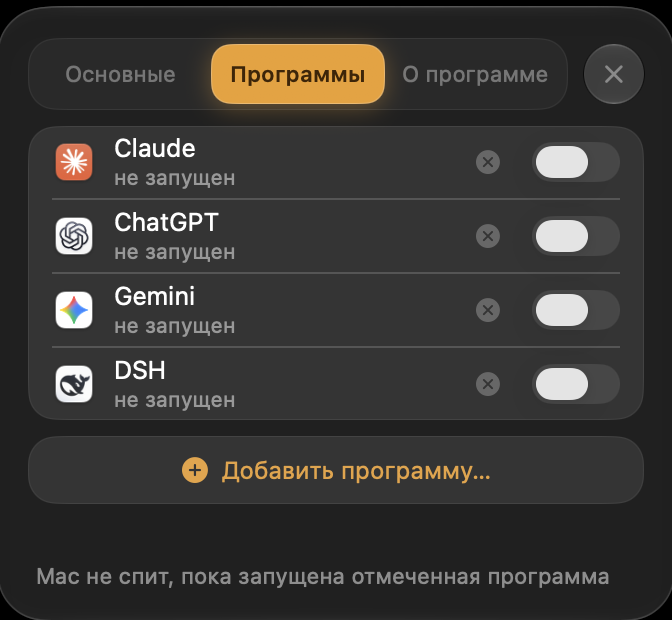
Claude, ChatGPT, Gemini or any app of your own. Tick the box — the Mac stays awake while the process is alive. Close it — the coffee goes cold, the Mac sleeps.
- Ready-made Claude, ChatGPT, Gemini, DSH
- Any app via Add program
- Status: running · holding coffee
A glass instead of a button
Click the glass — coffee poured. Click again — drunk. No enable toggles.
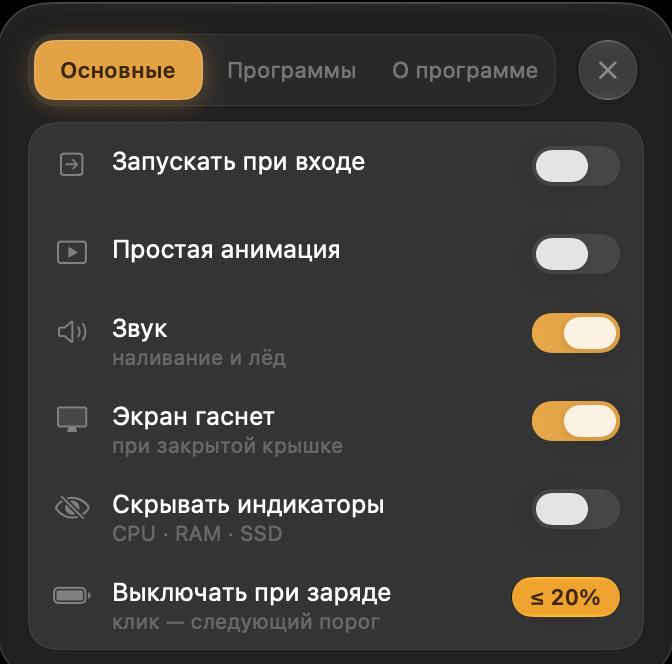
Coffee and ice sounds
Pouring, fizzing, clinking. The sound you open the panel for.
Cup counter
Cups per day and per week. The only statistic that makes sense.
⌥ + click
Toggle instantly without opening the panel. For those who already know.
Battery threshold
At 30% the coffee ends by itself — the Mac goes to sleep instead of dying.
Simple animation
If the glass is too much — one checkbox leaves just the numbers.
Est. 2026 · macOS menu barfreeGive me my
fucking coffee
Your Mac won't sleep until it finishes the cup.
Three steps
to the first cup.
Download the .zip
2.2 MB, no installer. The button always points to the latest version.
Clear the quarantine
The build is ad-hoc signed, so macOS asks about an unidentified developer. One command in Terminal:
xattr -dr com.apple.quarantine "Give Me My Fucking Coffee.app"Move it to Applications
And launch it. The first time you enable the lid feature it asks for an admin password — once.
Short.
Is it really free? +
Yes. Free, no subscription, no ads. If you want to say thanks — donate on Boosty, the link is in the footer and in settings.
Why Apple Silicon only? +
The build is thin arm64. It physically will not run on Intel Macs, Rosetta will not help. Check with uname -m.
What does it do with the lid? +
It sets pmset -a disablesleep 1 — what caffeinate does, but with the lid closed. That needs admin permission once: a sudoers rule allowing exactly two commands.
Will it drain the battery? +
At the battery threshold the coffee ends by itself. The threshold is configurable, 30% by default.
Download. Pour.
Close the lid.
macOS 14+, Apple Silicon, 2.2 MB. Your Mac knows what to do next.